
The state of Video Catalog Ads on Meta: what's working and how to start.
July 23, 2026
It has been two years since Meta first introduced video Catalog Ads, a format e-commerce advertisers were excited to explore and add to their content mix.
In recent months, we have noticed Meta paying extra attention to it, publishing new business case studies and repeatedly bringing up the format in calls with larger advertisers. And the numbers behind that push are strong.
According to Meta's own reporting, catalog product video can drive 20% more conversions per dollar. On, a Swiss running shoe brand and one of the first to test the format, saw a 41% increase in return on ad spend and a 45% decrease in cost per purchase when using catalog product video compared to ads without it.
Add to that the fact that video now accounts for roughly half of all time spent on Facebook and Instagram, and video Catalog Ads start to look less like an experiment and more like an obvious move.
And yet adoption remains slow.
That is the puzzle we wanted to understand. The one creative upgrade nearly everyone believes in, on the format the platform is actively rewarding, is also the one advertisers keep putting off.
So we looked into how the format has developed over these two years: what brands are doing with it, what results they are seeing, and whether there is any low-hanging fruit for anyone considering it.
Let's get into it.

What are video Catalog Ads?
Let’s start simple.
A video Catalog Ad is a Catalog Ad where the creative is a video rather than an image.
Think about video Catalog Ads in the same way you think about regular Catalog Ads with image creatives. The only difference is that video Catalog Ads use a video instead of an image.
Everything else works the way you expect. Meta's AI dynamically shows each user the product they are most likely to buy, so you get the platform's personalisation engine paired with a better-looking, motion-first creative.
One thing that trips people up early: this feature goes by several names, and they all describe the same thing. You will see it called:
- Video catalog ads
- Product-level video
- Video catalog
Meta's own implementation is branded Catalog Product Video, launched to all advertisers in May 2024 through Advantage+ Catalog Ads. The underlying principle, automated personalized video at the product level, is the same wherever you see it.
The simplest way to understand the upside is this: video Catalog Ads carry the same advantages video has always had over static images, now applied to every product in your catalog automatically. And there is a quieter benefit on top. Because a video shows the product and the offer more completely, the customer arrives with a clearer, more accurate picture of what they are buying. Meeting that expectation up front tends to mean better satisfaction after the sale, and fewer returns.
Video Catalog Ads are not a prettier version of what you already run, they let you say more per ad than static ever could.
How they differ from regular video ads
It is worth separating video Catalog Ads from the thing most people picture when they hear "video ad": a single, handcrafted commercial. That kind of ad is one polished film, made once, featuring a handful of products, and it is expensive and slow to produce.
A video Catalog Ad is not that. It is a system. You build one template, connect it to your catalog, and every product gets its own video automatically. Change a price and the ad updates. A product sells out and it stops serving. Add two hundred new products and they all get video ads with no extra productio
Who can use Video catalog ads?
Video Catalog Ads are accessible to anyone who already has access to Catalog Ads.
It is important to understand that every product in your catalog gets its own video ad.
These videos can either come from existing videos in your product feed or be created from scratch using tools like Confect.
This means you can still run video Catalog Ads even if you do not already have videos for your products.
Instead, you connect your product feed to Confect and create a video template using a simple video editor and your product data. Confect then generates a unique video for every product in your catalog, ready to use on Meta.
The video template pulls live data from your product feed, including the price, stock level, product name, discount percentage, review rating, and more.
All of this information can be displayed and animated inside your video Catalog Ads.
[INSERT VISUAL: Videe editor]
How are Video catalog ads shown in Meta?
The main difference is how video Catalog Ads are delivered on Meta.
A video Catalog Ad is shown as a single video rather than a carousel.
Unlike a standard Catalog Ad, you will not see several products displayed side by side in the same ad. Each video focuses on a single product.
[INSERT VISUAL: a video Catalog Ad in it's native placements x for carousel , check for stories and IG Feed]
The winners: who is using it, and what results have they got?
The brands that moved early on video Catalog Ads have a few things in common.
They did not wait for the perfect production. They started with the video and images they already had, kept the creative simple, and let the format do the work. And the results followed.
That is the pattern worth noticing before any single number: this is not a case of a handful of huge brands with unlimited budgets pulling off something the rest of us cannot. It is early adopters making a straightforward switch and being rewarded for it, partly because they were early. Meta is actively pushing the format, and the advertisers already running it are the ones benefiting while most of their competitors are still thinking about it.
The brand results below are drawn from Meta's published success stories. They reflect Meta's own measurement, so read them as directional, but the consistency across categories, from fashion to electronics, is the signal worth taking.
Mango
Mango, the global fashion retailer, ran video Catalog Ads across its broad product range and saw a 65% increase in incremental purchases, alongside a 49% lower cost per incremental add to cart and a 6.5x incremental return on ad spend. The incremental framing matters: these are purchases attributable to the video Catalog format versus a control group, not total purchases, which makes it one of the cleaner reads of the format's true effect.
Source: Meta business success story with Mango
[VIDEO EXAMPLE: Mango video Catalog Ad. Show a garment in motion with the price and product name overlaid.]
Bonprix
Bonprix, a fashion and lifestyle retailer, measured an 18% purchase lift, alongside a 16% lower cost per purchase and a 25% higher return on ad spend, using Meta's brand-lift methodology across a broad fashion catalog. What makes bonprix instructive is scale: this was not a handful of hero products but a large, varied catalog, which shows the format holds up when it is applied across thousands of SKUs rather than a curated few.
Source: Meta business success story with bonprix
[VIDEO EXAMPLE: bonprix video Catalog Ad across several product types.]
Unieuro
Unieuro, an Italian electronics retailer, saw a 3.1x increase in return on ad spend, alongside an 83% lower incremental cost per purchase and a 6% lower cost per impression. Electronics matters here because it is a price-sensitive, comparison-heavy category, quite different from fashion. A strong result outside apparel is a good signal that the format's advantage is not just about showing clothes move, it travels to categories where specs, price, and product detail drive the decision.
Source: Meta business success story with Unieuro
[VIDEO EXAMPLE: Unieuro electronics video Catalog Ad with product detail and price.]
Fashion Days
Fashion Days, a fashion eCommerce brand, saw a 13% increase in ROAS with video Catalog Ads. On its own the number is modest next to the headline results above, and that is exactly why it is useful: it is the kind of steady, repeatable lift most advertisers should actually expect from switching creative format, rather than an outlier. A solid double-digit ROAS gain across a working fashion catalog is a realistic base case, not a best case.
Source: Meta business success story with Fashion days
[VIDEO EXAMPLE: Fashion Days video Catalog Ad across several apparel products.]
But Meta is not the only one seeing success.
Across Confect we have had the pleasure of talking with early adopters and hearing how they think about video Catalog Ads.
BeSocial and Baum und Pferdgarten
Most of the results above come from very large brands with Meta's direct support. BeSocial were among the first to run dynamic, per-product video Catalog Ads for independent eCommerce brands, and they documented how an ad like that is actually built at the product level.
For Baum und Pferdgarten, the video Catalog Ad was created from videos the brand already had sitting in its feed. Testing video Catalog Ads was the natural choice precisely because the videos were already there, no new production required. The video format gave customers a richer, more interactive way to engage with each product, and the ad was optimised for Stories.
[VIDEO EXAMPLE: Be Social x Baum und Pferdgarten video Catalog Ad, optimized for Stories.]
Incubeta and Nobody's Child
Incubeta created video Catalog Ads for Nobody's Child's Black Friday campaign, among the first to run the format in the United Kingdom. What is interesting about this one is not a headline number, it is the thinking behind it.
[VIDEO EXAMPLE: Incubeta x Nobody's Child Black Friday video Catalog Ad.]
When we spoke with Will from Incubeta, he was clear that the value of video Catalog Ads is not always a single before-and-after metric. Video, he explained, is great for giving a product more context and showing information that simply does not fit on a static ad. And he sees video as the medium that keeps growing, so building the capability now is a deliberate bet on where attention, and modern media buying, is heading. For a lot of advertisers that is the more honest reason to adopt: not one campaign's lift, but making sure video is a real part of the creative mix before everyone else catches up.
[VIDEO SNIPPET: Will from Incubeta explaining the approach.]
Why are brands not creating video Catalog Ads?
The brands above prove the results are there. So why haven't we seen mass adoption yet?
There is one genuine hurdle worth naming honestly: video Catalog Ads need video. Some brands already have video sitting in their product feeds, some have it for a few products, and most have none at all. That is the real reason adoption stalls, not budget and not complexity.
Around that one real constraint, three myths have grown up and done most of the blocking, and all three are wrong.
The first is that video Catalog Ads need to be produced like a Hollywood movie: a film crew, a studio, and a five-figure budget per campaign. That is what a traditional video ad costs. It is not what a video Catalog Ad costs, because you are building a template once, not filming a commercial.
The second is that it only works if every product already has its own video. Most catalogs have thousands of SKUs and video for almost none of them, but the easiest way to run video Catalog Ads uses no per-product video at all, and AI can now do the tedious animation work for you. More on that below.
The third is simply that video Catalog Ads are not available to everyone. They are, and they have been rolled out to all advertisers.
Here is the part that undoes the hurdle: you can run video Catalog Ads whichever of those three situations you are in, whether you have video for every product, a few, or none.
The setup differs slightly depending on how much video you already have, but there is a working path for all three, and you can start small by running one on a single product set without touching the rest of your setup.
What video Catalog Ads brands are creating?
Here is what each of those three paths looks like in practice. All are available to nearly every advertiser, whether you are just starting with Catalog Ads or you are an advanced user.
Video Catalog Ads made with branded video
Upload a single video you already have: a brand video, a piece of UGC, or an ad video that already performed well. Use it together with your product images so the video plays as an intro and the product comes in after it.
Every product uses the same intro video, but each ad still serves a unique product. That is not a problem, because each user sees different products anyway. After the intro video you can show a single product shot or build a short slideshow from your existing images.
[INSERT VISUAL: diagram outlining the structure of a video Catalog Ad made with branded video: shared intro clip, then a unique product per ad. Storyboard-strip style.]
This is fast, needs very few assets, and pretty much every brand already has a video that fits. Pairing a video that already worked with your catalog is the quickest way to be live, and the same asset can be reused for product-level video on other channels, so the work is not locked to Meta.
[VIDEO EXAMPLE: a video Catalog Ad built from a branded intro video plus product images.]
Video Catalog Ads from static elements
Take the static elements you already use and give them motion. Add transitions, animation, or movement to a price badge, a product image, or a text layer. This can be as simple or as elaborate as you decide.
[INSERT VISUAL: diagram outlining a video built purely from animated static elements, a price badge sliding in, a product image with subtle motion. No filmed footage.]
The important part: this path needs no video files at all. You are animating what you already have, which means any advertiser with a working static Catalog Ad template can do it.
[VIDEO EXAMPLE: a video Catalog Ad made by animating static feed fields.]
Video Catalog Ads from dynamic per-product video in your feed
If you do have product-level video, this is the richest version. Dynamic video files are pulled from your feed, one clip per product, mapped to product IDs. When a product has a video it plays that clip; when it does not, it falls back to one of the easier paths.
[INSERT VISUAL: diagram of the in-feed structure, feed rows with a video field mapping one clip per product ID. Technical/schematic style.]
Be Social, credited above, produced exactly this kind of ad, and their work is the best look at how it comes together at the product level.
[VIDEO EXAMPLE: a video Catalog Ad built from per-product video in the feed.]
Video catalog ads made with help of Ai.
You read that correctly, Ai can help you make video catalog ads.
Across all three paths, the slow part is the same: animating things. Building the transitions, the movement, the timing, frame by frame.
Confect's AI video editor removes most of that work. You describe what should happen, "animate this product image, bring the price in, add a subtle zoom", and it produces the video for you.
Set expectations honestly: this is not going to hand you a perfect, hand-crafted film. What it does is take the majority of the tedious animation work off your plate, fast, so you can get from static assets to a working video Catalog Ad without an editor or a production timeline.
For most advertisers most of the time, that trade is exactly the right one, and it is what turns the middle path from "someday" into "this afternoon."
[VIDEO EXAMPLE: the Confect AI video helper in action, a static product becoming an animated video from a text instruction.]
Video Catalog Ads and Andromeda
A fair question about any format is whether it survives the platform's next big change. For video Catalog Ads, that test already came. In October 2025 Meta completed the global rollout of Andromeda, its AI retrieval engine, which changed how ads get selected and shown, and it is worth looking at how the format held up.
Under the old system, targeting parameters did most of the work. Under Andromeda, creative does most of the work: the engine reads your ad, visually and semantically, and decides who should see it based on creative resonance rather than audience definitions. Your creative is now the primary targeting mechanism, and creative diversity matters more than ever.
This is why the results brands are seeing hold up mechanically, and it comes down to two things a static Catalog Ad cannot do. First, video and static are treated as distinct creative entities at retrieval, so they compete separately for auction entry and reach different audience pools. Adding video is not just more of the same, it is a genuinely different entry into the system. Second, watch-time is a qualitatively different signal than a click: sustained, product-level attention gives the algorithm a richer read on buying intent, which it then uses to find more people like the ones who watched.
So how have video Catalog Ads held up through this shift? If anything, Andromeda has made them more valuable, not less, and the clearest sign of that is who is using them.
Top performers are 62% more likely to use Video Catalog Ads
When we looked across our dataset, one pattern stood out immediately: the advertisers already getting the best results are far more likely to have adopted video Catalog Ads. Top performers are 62% more likely to run them than bottom performers.
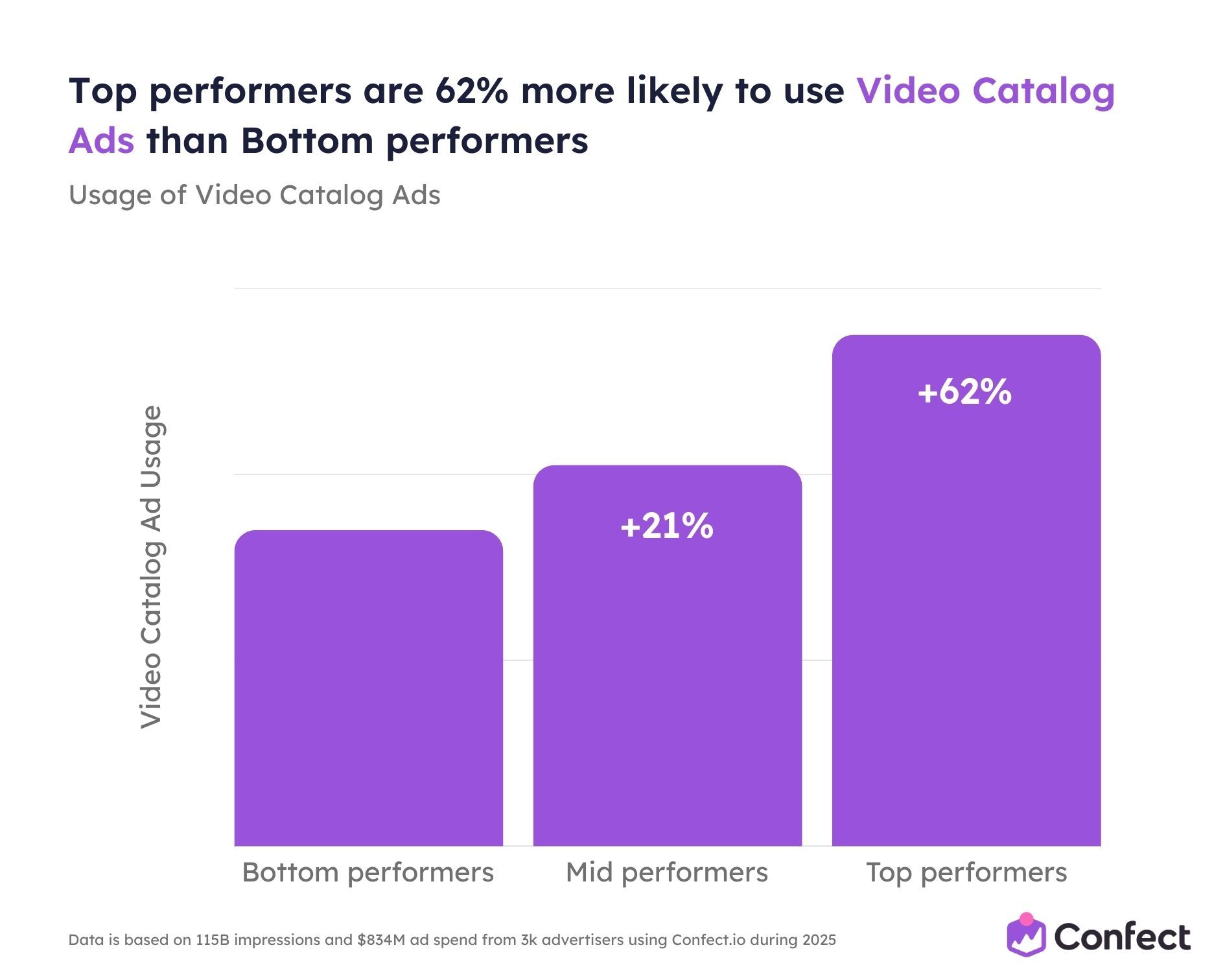
That is not a coincidence. The advertisers winning under Andromeda have gravitated to the format because it gives the engine exactly what it now rewards: rich, varied, data-dense creative. Video Catalog Ads are rich in data, and Andromeda rewards data. The best advertisers have simply worked that out first, and video is one of the formats they experiment with far more than everyone else.
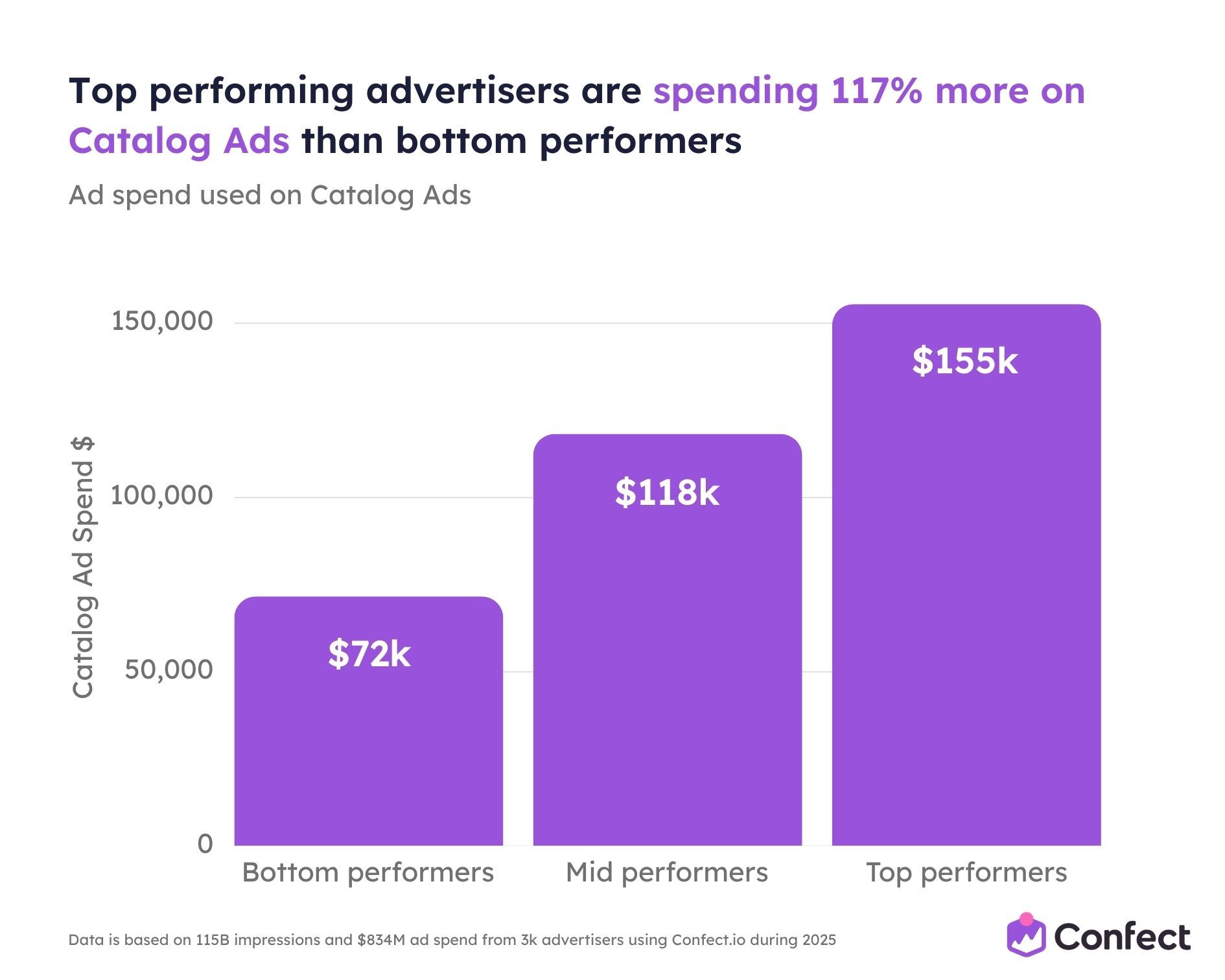
117% more spend on Catalog Ads by top performers
The format experimentation sits on top of a much bigger commitment to Catalog Ads overall. Top-performing advertisers invest 117% more in Catalog Ads than bottom performers, more than twice as much, and the gap is widening as Andromeda matures. They are not dabbling in the format, they are backing it with budget, and video is where a growing share of that budget goes.
Top performers earn 60% of their revenue from Catalog Ads, versus 38% for the rest
And this is what the spend and the experimentation are chasing. For top performers, Catalog Ads generate 60% of total ad revenue. For bottom performers, the figure is 38%. Catalog Ads are simply the most revenue-generating format available to an eCommerce advertiser right now, and the best advertisers have organized their whole media mix around that fact.
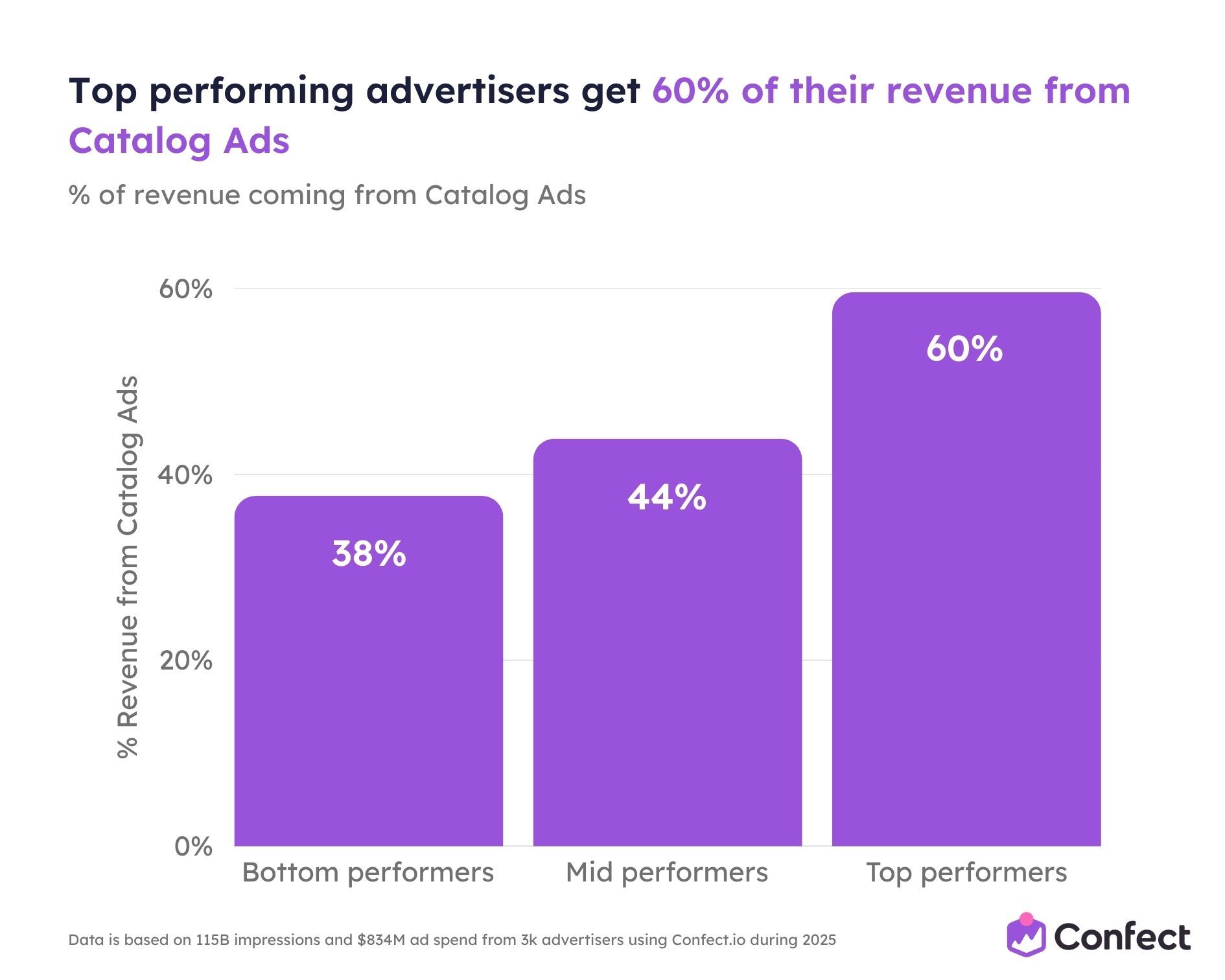
Read together, the three numbers describe a loop rather than three separate facts. Top performers recognize that Catalog Ads are the format that generates the most revenue, so they allocate more spend to it, and they experiment with far more formats inside it, including video. That spend and experimentation drive more revenue, which funds more of both. Bottom performers are outside the loop, running less, testing less, and earning a smaller share from the format that pays best. Video Catalog Ads are one of the clearest places that gap is currently opening.
Where video Catalog Ads serve: the placement guide
One practical reason to activate video Catalog Ads is how naturally they fit the placements where people now spend their time. Two facts to get straight first, because they are the ones advertisers most often get wrong:
- Video Catalog Ads work on every placement. They serve across Feed, Stories, Reels, Marketplace, and In-Stream, the same placements static Catalog Ads reach. The difference is not where they can run, it is how well they perform once they get there.
- They do not show up as carousels. You will not see two videos side by side. Each video Catalog Ad serves as a single-product video unit, not a swipeable row.
Video Catalog Ads on Stories
Stories run full-screen in 9:16 and auto-advance, and this is the placement where video Catalog Ads look their best. Motion holds attention through the auto-play cycle where a static image has to fight to stop the swipe, and the full-screen frame gives the product and the data overlay room to breathe. If you are going to optimize the look of one placement first, make it Stories. Stories also tends to deliver lower CPMs than Feed.
[VIDEO EXAMPLE: a video Catalog Ad running full-screen in Stories (9:16), with the auto-advance bar and a product-data overlay in the safe zone.]
Video Catalog Ads in Reels
Reels serves video Catalog Ads full-screen in 9:16, competing natively alongside organic short-form video. Static can technically run here, but this is where video earns the largest gain: a product-on-white with a sliding price badge looks like an ad, while a lifestyle video with a subtle product overlay looks like content, and Reels rewards the latter. For cold prospecting into the placement that now accounts for a large share of time on Meta, this is the one to prioritize.
[VIDEO EXAMPLE: a video Catalog Ad in Reels, native-feeling motion with a light product overlay.]
Video Catalog Ads in Feed
Feed supports both static and video, most commonly in 1:1 and 4:5, and motion in a mostly static environment creates a contrast effect that improves scroll-stop rate. Alongside Feed, Marketplace is an underused, high-intent placement: users opened the app to look at products, so video Catalog Ads reach them in an active shopping mindset. In-Stream serves as mid-roll inside longer video content, which suits brand-awareness and prospecting uses.
[VIDEO EXAMPLE: a video Catalog Ad in Feed (1:1 or 4:5) with data overlays.]
Best practice with video Catalog Ads
The learning phase and video Catalog Ads
Here is an advantage that rarely gets mentioned, and it removes one of the last real objections to trying the format. Just like image Catalog Ads, video Catalog Ads do not re-trigger the learning phase. Creating a new video design, or changing an existing one, does not send your campaign back to square one. The new creative goes live with all of your existing learnings intact.
[INSERT VISUAL: a simple before/after showing that a new video design does not reset the learning phase, one steady performance curve with a flag marking "new design added" and no dip.]
With most ad changes, the fear is resetting learning and paying the exploration tax all over again. With Catalog Ads, image or video, that tax does not apply. You can test a new video design on top of a mature, well-optimized campaign and keep the performance you have already earned. There is almost no downside to trying.
Scheduling video Catalog Ads ahead of time
Video Catalog Ads are not only an always-on format. You can build campaign-relevant video Catalog Ads and schedule them in advance, so a seasonal or promotional design goes live exactly when you want it and steps down when the moment passes. That makes them just as usable for a Black Friday push or a product launch as for evergreen retargeting.
[INSERT VISUAL: a calendar/timeline strip, an evergreen video running continuously with a scheduled seasonal design switching on for a promo window.]
Use video Catalog Ads with product sets
You do not have to treat your catalog as one block. You can run video Catalog Ads across every product, or point them at a specific product set, a category, a promotion, or just your sale items, while the rest of the catalog keeps its evergreen treatment. You can also hold multiple videos in one feed, so different products or product sets carry different clips. A sale collection can run its own urgent, discount-led video while your hero products run a richer brand-led one, all from the same catalog.
When most people hear "video Catalog Ads" they imagine a production problem: someone has to film thousands of products. That assumption is the single biggest reason advertisers delay, and it is wrong.
Display product and brand information in your video
Video Catalog Ads are a perfect outlet for making sure your brand is present in every ad. In fact, video gives you access to more branding elements than a static ad does. On top of the usual brand name, logo, colors, and fonts, you can also bring in your branded video and audio assets, so the motion and the sound carry your brand too, not just the visuals.
Use additional images as video frames
Most product pages carry several images per SKU: front, back, detail, lifestyle. In a video Catalog Ad, those additional images become frames in an animated slideshow. A three-second clip cycling through front, back, and detail, automatically, for every product, with no new photography, is a richer ad than any single static image.
[INSERT VISUAL: a feed-to-ad diagram. Left, a feed row showing id, title, price, image_link, additional_image_link[0..2]. Arrows map the image fields into sequential frames of a short slideshow video. Technical/schematic style.]
An advertiser with a 2,000-SKU feed already has 2,000 video ads waiting to be assembled. The template is the only thing that does not yet exist.
Include overlays and frames in your video Catalog Ad design
A common misconception is that a video Catalog Ad means a raw product clip served as-is: no text, no price badge, no design. That is not how template-based video Catalog Ads work.
The video clip is one layer of the creative. On top of it you apply exactly the same design logic you would use for a static Catalog Ad: price overlays, discount badges, product name, review ratings, stock indicators, brand colors, logo placement, any dynamic field from your feed. The template controls both layers at once. The video provides motion and richer behavioral signal; the data overlay provides the commercial information that turns attention into intent. Your existing static template logic transfers almost directly to video. You are adding a motion layer, not rebuilding your creative system.
[INSERT VISUAL: an exploded "layers" diagram, three stacked planes lifting apart, video clip at the bottom, dynamic data overlay (price, rating, "Only 3 left") in the middle, brand layer (logo, colors) on top, combining into one finished frame.]
What Good video catalog ad has
The good news is that a video Catalog Ad follows the same principles as any good video. If you already know what makes a normal video ad work, you know most of what makes a video Catalog Ad work too.
In practice, the best ones tend to be short, usually 5 to 15 seconds. They present information gradually rather than dumping everything at once, letting the product, price, and offer land in sequence. And above all, they focus on hooking the viewer in the first few seconds, because that is where attention is won or lost. Get the opening right, keep it short, and reveal the detail as it plays, and you are most of the way to a video Catalog Ad that performs.
What's next for you with video catalog ads?
Step back from the detail for a moment, because this is the part that matters most.
Almost everything that used to make video Catalog Ads feel like a big project has quietly gone away.
You do not need a film crew.
You do not need a video for every product.
You do not need to touch your whole catalog to try it.
And you do not need to gamble your existing performance, because the learning phase does not reset when you test.
What you are left with is close to a free swing. Most advertisers already have a video that would work, a feed full of product images that can become frames, and the option to let AI animate the rest. The brands seeing results did not do anything heroic, they just started before their competitors did.
That is really the whole story of where video Catalog Ads stand today.
The format is proven, the platform is pushing it, the tools have caught up, and adoption is still low enough that moving now is an advantage in itself. The gap between the advertisers running video Catalog Ads and the ones still thinking about it is only going to widen from here.
The takeaway
Video Catalog Ads are not a new experiment any more. They are a proven, platform-backed format that the best advertisers have already built into their mix, and one that most of the market has not. The results are there across fashion and electronics, the format holds up under Andromeda, it reaches the placements where attention now lives, and it can be built from things you already own.
If there is one thing to take away, it is that the barrier to starting is far lower than it looks, and the cost of waiting is quietly rising. Pick one video you already have, point it at a single product set, and see what it does. That is the entire first step.
If you want a hand with that step, that is exactly what Confect is built for: connecting your product feed, designing the template, and generating a unique video for every product without an editor or new production. You can explore how it works or see how other brands design their Catalog Ads whenever you are ready. And if you would rather just talk it through, our team is happy to help you find the fastest path in.